Greetings!

The main purpose of this website is to support Android indie game developers with tutorials, reviews and promotion of their games. The main difficulty for the developers is not to make the game, but to get exposure. To get it out there. If you find anything useful here, please spread the word. Like my page on Facebook, follow me on Google+ or Twitter. Thank you!

Google+ Facebook Twitter

× close

Sunday, 13 October 2013

Android Game Development Tutorial in AndEngine - Part 1 - Introduction

Articles in this series of tutorials are intended for anyone who wants to make a game. I picked Android because it is quickly taking over the mobile market and it is by far the easiest platform to start making games.

This tutorial requires that you already have basic knowledge of Java up to a level when you are able to write, compile and run your own application.

You are reading this page because you want to make a game. Chances are you have already done your research and picked AndEngine, but let's start from the beginning.

How do I make a game? What is the best way to make a game?

This is probably the question that you already asked. Making a game (any game for any platform) requires a lot of work, patience and perseverance. It's certainly not easy! There is no simple answer to this question.

There are many ways how to make a game, and this tutorial shows you one way. The best way to make a game is to pick a game that you can finish and simply do it.

How long does it take to make a game?

I bet you have asked this one too. But again, a question without answer - it can take days in case of a very simple game, or years.

Why AndEngine?

AndEngine is one of the easiest engines to make a game with while giving you plenty freedom to use any resource that Android and Java offer. There are frameworks that give you even more freedom but you need to put more effort into the game developmnet, for example libgdx. And there are game-maker programmes that restrict your freedom, but making games is very simple. AndEngine is the happy medium.

So how do I start?

Start small! Even if you have a great idea for a game, and this is your first attempt, leave it for later. First take something really simple and try to make it into a game. Or make a clone of a classic game like Tic-Tac-Toe, Pong or Space Invader. Make something you can finish in few weeks.

Introducing Squong

We are going to make a variant of a classic game Pong. I call it Squong because it's a mix of Pong and Squash. I will guide you through the whole development process from making the idea, designing the game, writing the code, testing and publishing the game. I will also cover basics of promoting your game.

The game is already published, but only as beta version. If you want to follow this tutorial and see the game, you can join the beta test. I will explain later what are the benefits of the beta test phase.

Later I will publish the complete source code of the game and you will be permitted to use any part of the code in your games if you comply to its license.

First you need to join the following Google+ community. It's public, so anyone can join:
https://plus.google.com/communities/117947815780337015177

Next, visit the following link a click on Become A Tester button:
https://play.google.com/apps/testing/is.kul.squong

Afterwards you can proceed to download the game. When logged with the Google account you have used to sing up for beta test, you will see it in Play Store as if it was publicly available:
https://play.google.com/store/apps/details?id=is.kul.squong

Next part

In the next part I will cover the concept of Squong. How did I get the idea and how did I started.

Further reading

I wrote a book about AndEngine. You can also see the list of books about Android Game Development for further reading.

Note: I had to take a break from writing this tutorial. The game is published in Google Play store now. You can still get the full source code of the final game for 99¢. Available on Sellfy, pay by PayPal:
buy

Also here's one Box2D physics problem that is directly related to the Squong game. If you find a solution, let me know! 
Read more »

Sunday, 6 October 2013

AndEngine Tutorial - Using Git and GitHub

This tutorial is part of AndEngine basics.


<< List of all tutorials

Using GitHub is simple, but can be intimidating if you've never worked with version control before. If you did, you probably don't need this tutorial. I will cover the simplest case: Cloning the repositories from GitHub to your local machine. This replaces the steps in previous tutorials: Getting Started and Extensions and Examples.

What is Git anyway? 

It's a version control tool. Basically a storage for source codes (and other files) that saves the initial commit and then incremental changes.  Imagine you have a file that contains string: "Hello". You commit this file to Git and it will be saved as "Hello". When you make a change on your PC to "Hello World" and commit, the change will be saved as "Hello" > "Hello World" and the number of the line where this change occured. This way you can roll back to older version and track changes.

It also helps collaboration, creating forks of the projects etc, but again, if you need to do that, then you should not need this tutorial!

What is GitHub?

A free Git hosting for Open Source public repositories and paid service for private repositories.

So how do I use it?

First you need to install Git client. Because you are most likely using Eclipse IDE (or Google's ADT which is Eclipse), the easiest way is to grab the Eclipse Git plugin.

Go to Help -> Install new software.


Click Add to add a new plugin repository and use this URL as location: http://download.eclipse.org/egit/updates


Click OK and Select All.


Then simply click Next and accept all licenses until you can press Finish. If you are asked to restart ADT (Eclipse), do it.

Clone the repository from GitHub to Desktop

Cloning in Git means making a copy from the repository into local machine. That is an exact copy that can be synchronized with the repository. As opposed to fork, which is a new copy... But don't worry about forks now.

In Eclipse, go to File -> Import and select Git -> Projects from Git


And then from the options select "Clone URI". Enter the repository of your choice as URI and the rest will be filled in by Eclipse:


To get the Git repository URI  e.g. https://github.com/sm4/AndEngine and copy the URL of the Git repository from this box:


On the next screen select only the branch that you are going to use. Branch is a separate version of the project - using the GLES2-AnchorCenter is recommended.


Then select local directory, I highly recommend using the workspace folder.


Wait for Eclipse to download the project and last step, select "Import Existing Projects"


Click Next, and then Finish and you have successfuly cloned Git repository to your desktop. Do this with any repository you need.

Conclusion

Having the cloned repository is useful, because you can then easily get latest changes without downloading everything again. But if this is easier than the download-zip method, I leave up to you!
Read more »

Construction City Review - Heavy Equipment Playground

It's hard to believe that Mathew - one of the most influential persons in AndEngine - never released any games. Until last week. Long awaited Construction City was finally published to Google Play store. And it was worth the wait.

Construction City is a 2D puzzle game that lets you sit behind the wheel and controls of the most popular heavy equipment machines. You can experience driving and controlling cranes, excavators, trucks, tractors, helicopters and forklifts. Every machine has customized and precise controls. Sometimes it's just forwards and backwards when you drive trucks, but controlling a mobile crane is a different story. You control the car movement, arm position and extension of the grapling hook. In most levels you also have to controls more than one machine and switch between them at the right time.

The game allows you to fully customize the on-screen controls and that makes the game playable on both small and big screens.

All machines are well modelled and the graphics are amazing. You can see the tiniest details - and the machines behave almost like their real life counterparts. As far as 2D allows...


In total, there are five different stages with 21 levels each and one extra bonus level. Each level presents a different puzzle with increasing complexity and difficulty. And in case you finish everything, Construction city has one big surprise for you...


Level Editor

Level editor is something unheard of on this platform. And not only allows you to create your own levels but also play levels created by the community. While there are other similar games to Construction City, level editor gives this game the edge over the others. It will certainly appeal to creative players. I found the editor a little bit hard to use on the phone, but I can imagine it works very well on a tablet.


Conclusion

Construction city is a very well made game. You can tell that the author paid a lot of attention to details and made sure all machines behave as they should. Neat 2D gaphics, good sound effects and a level editor packed in a game that is completely free. If you like this kind of puzzle games or heavy equipment, you won't be dissapointed.

Install it for free from Google Play
Read more »

Tuesday, 1 October 2013

Mathician - Social math

This "game" is actually an educational app. It helps you practice your math skills. The gameplay is really simple. You will be guided through many levels doing harder and harder additions, subtractions, multiplications and divisions. Each level presents you with equations to solve and a keypad. You earn stars for avoiding mistakes and calculating the problems fast...

But that is not all. The thing that makes this app different from the other math apps is the social aspect. The author who goes by the name of TwZ added achievments, leaderboards and even an option to challenge real players, including your friends from contact list.

Without the social part, this game would probably be boring as math can be sometimes. But the option to compare yourself to the world and especially to your friends keeps you engaged.


If you are a competetive person, you will probably find yourself coming back to this game. And in the meantime you will practice your brain which is never a bad idea.

Conclusion

There's not much to say about this game - it's really just a simple math skills practicing app with social aspect. But if you like challenge and/or math and have a group of similar minded friends, give it a shot!

Read more »

Saturday, 28 September 2013

Mr. Dandelion's Adventures - Last Big Update

After much thought, I have decided to stop working on Mr. Dandelion. It was a great learning experience, but I have missed many important points when I released it and now it's too late to fix the mistakes. I like the game and I think it's not bad, but I simply did not know how to get it out there and it shows. I will summarize what I have learned in a series of tutorials I want to write.

Even though Giftiz featuring temporarily brought some players to the game, it's not enough. I have finished 3/4 of the levels I wanted. Summer, Autumn and Winter seasons are done. I only finished it because some people actually asked for it on Facebook :)

I will focus on other games now and possible on other frameworks. AndEngine is not bad for a start, but it is not very well maintained and hardly updated nowadays. I will create one more game in AndEngine just because I have an idea that I want to make it quickly, but after that I will move to other libraries. There's plenty of them to choose from...

Link to Google Play Store

Some screenshots from the winter level:


Read more »

FIFA 14 review - Future of Mobile Gaming?

If you have ever doubted that the future of gaming is mobile, another argument was just released to Google Play store (and Apple App Store too).

FIFA video games series started in 1993 and since then EA is releasing a new version every year. If footbal (or soccer if you wish) is one of the most popluar sports of the planet, FIFA from EA is equally popular among the video games - it's one of the best selling titles out there and sells every year.

I was never a big fan of sport games, unless it's something really special, but when I saw the screenshots from FIFA 14, I just had to try. The visuals are simply stunning. I only played it on my phone's 4.55" screen but it looks awesome. This game gets maximum out of the mobile hardware. And it's not just graphics - the animation looks very realistic too.


I could hardly believe this is just a mobile game and it can be downloaded for free. Of course to play tournaments or leagues, or to become the manager, you have to use in-game purchase to unlock these modes. But even for free this game rocks. It's simply the best looking mobile game, I've ever played.


Downside of this are the hardware requirements - it's not only the best looking but also the most demanding game out there.


But look at the level of detail and you will understand why.

The menu interface of the game is very nice too, makes the best use of the touch screen I've seen so far. The touch controls are a bit inconvenient on harder difficulties, but there's still option to use the classic on screen buttons. Music is great too, EA always licenses contemporary pop/rock music for the game. And traditionally the game contains high quality live commentary.

Conclusion


There are millions of other features like social networking, trading, etc. that I will never use, but they can make the game certainly more interesting. For me the quick games like Games of Week which feature the real matches of the current week (including some of the real events from the games!) are enough and they make this game worth it, despite the humongous download size (1.5GB).

Download from Google Play Store
Read more »

Tuesday, 24 September 2013

Giftiz Review - App Discovery with Gifts, Worth for Indie Developers? Part 1 - Updated

Giftiz is an app discovery service for Android. They offer real gifts for playing games. People are motivated by the gifts to download a game, play it for a while to complete a "mission" and earn XP points that can be spent on the gifts. This article is a review of the Giftiz service from the perspective of the game developers.

So what's in it for the developers? Giftiz has quite a large number of "players" that use the Giftiz app. Your game will be offered through this app and you can be sure the players will play it for about 5 minutes - that is the requirement of the mission. What exactly is a mission is upto you.


What's the catch?

What is the costs of this publicity? Well of course it's not for free. At least most of the time. Giftiz is a paid service for developers. Developers pay for each install coming from Giftiz. If it is worth or not depends on the deal you can get from them. But of course to create a successful game, you need to get as much publicity as you can in the first month in the store...

My story

The company behind Giftiz contacted me  first with another offer - their mobile ads AdBudiz. But I was not really interested. It was shortly after the release of Mr. Dandelion and I made a joke that the only thing I need is some publicity and they actually offered me Giftiz. For free. Since Mr. Dandelion is my research project, I said why not?

I was told that Giftiz discovers suitable Indie games and offers them Giftiz deal for free. I bet it's profitable for them, because they need to keep the players engaged. And of course the paying customers need this too - to be discovered from more places. Pyramid Mover is another example of a game that got this deal.

Implementing Giftiz was very simple. They have a SDK that does everything for you and useful example projects. A Giftiz representative just checked if everyting works and that was it. I spent less than an hour adding it to my game plus some time mailing with Giftiz.

Yesterday was the first day of "featuring" of my game - which means yesterday the people can start playing my game to complete a mission. In my case it's completing first three levels. The featuring came quite late and won't help me to get to Top New category - simply because I am already past the 30 days of being new. Giftiz said that the paying customers have priority over free deals.

Conclusion


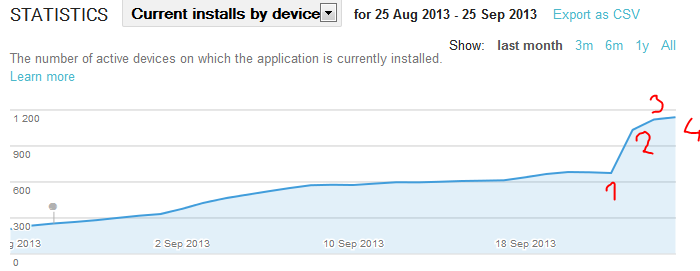
My game has been in the store for about 2 months now and the number of new installs was slowly dropping. After the Giftiz featuring, I immediately got cca thousand new installs on the first day. I can summarize the effect of Giftiz in 6 weeks when my featuring ends. I am going to post another article about it. Right now I believe this service has a potential to help you to get you to the Top New category. It all depends on the timing and the cost.

Here's the same graph after 4 days of featuring. About 1600 new downloads from Giftiz. I will try to get the real numbers from them for the second part of the article.


UPDATE: Graph after two weeks with Giftiz:


I am not affiliated with Giftiz and I am not getting anything extra from them for writing this.

Continue to part 2...


Read more »

Saturday, 21 September 2013

Sony Xperia ZR wifi problem - update

IMPORTANT! If you had the same problem as described here, please leave a comment with specifics of your problem! If you share the article, please share publicly to appear in the list of the comments. A lot of people are reading this article, so please add any information that can help future readers. THANKS! 

Finally, Sony made a phone that is exactly what I always wanted. 720p HD resolution on 4.5" screen, enough memory, big battery, good camera and dust and water proof. You can read positive reviews all over the web, so I won't bother adding another one.

After a week of being a happy Sony Xperia ZR owner, my wifi stopped connecting to networks. I can't connect to any network I have tried, but the list of networks is ok. It stopped working suddenly. My previously used networks are all marked as "Saved", but when I try to connect the following happens:

  1. Saved (doesn't even change when tapped)
  2. Connecting -> Saved
  3. Connecting -> Authentication problem -> Saved

This is what I have tried to fix it:

  1. Restart phone
  2. Restart phone, take out battery, SD card and SIM card
  3. Restart wi-fi router
  4. Connect to another network (sometimes works with some networks)
  5. Forget network -> Type password again
  6. Connect another Android device to the same network
  7. Connect another non-android device to the same network
  8. Change the router wireless settings to WEP, WPA and unsecured
  9. Factory reset of the router
  10. Sony Companion -> Repair
  11. Factory reset of the phone


And nothing worked. I packed the phone into the box ready to go to service centre and went to cook a delicious stew which took about 3 hours and filled my apartment with heavenly smelling goodness. I came back to check whether there are any data in the phone and it started to work again. Just like that. I did not do anything.

But my joy lasted only for a while, because after the phone lost the wifi connection, it didn't connect again. I took the phone to work to try more wifi access points. I have tried about 10 of them on the way there and three more in the office. Same result. I tried to dig deeper and this is what I found in LogCat:


09-18 09:10:12.130: W/wpa_supplicant(3838): wlan0: Failed to initiate AP scan
09-18 09:10:12.811: I/wpa_supplicant(3838): wlan0: Trying to associate with (here is the router MAC) (SSID='smartus@unifi' freq=2427 MHz)
09-18 09:10:14.023: I/wpa_supplicant(3838): wlan0: CTRL-EVENT-ASSOC-REJECT bssid=(here is my router MAC) status_code=1
09-18 09:10:19.088: I/WifiManager(2391): Process ndroid.settings requested an active scan
09-18 09:10:22.812: I/wpa_supplicant(3838): wlan0: Authentication with (here is the router MAC)


Same thing for every router. Sometimes the connection went through and then I would connect for a while. CTRL-EVENT-ASSOC-REJECT should only happen when the network is too busy and the AP rejects your connection attempt. I think the phone simply started to misinterpret signals from the router.

I took the phone the service centre, where they tried to flash upgraded ROM, but it did not help and the case was closed with the conclusion "faulty hardware".

I hope nobody will ever need to read this article. But if you are reading it, because you have the same problem, it might be hardware issue.

Update

The phone body was replaced. Wi-fi works very well now, but will wait for two weeks to make the final conclusion!

Update 2

The phone seems to work after another two weeks. No issues with wi-fi. Hopefully it's gonna stay this way. Also this article made it to TOP 5 articles this month. Looks like this is pretty common issue.

Update 3

Xperia user Emmanuel suggested that it might be a software issue caused maybe by a faulty hardware. The wi-fi region code gets set to wrong value or unset. If you have a rooted phone, you can try fixing it by this software: http://forum.xda-developers.com/showthread.php?t=1982149

My phone however didn't have a problem with wi-fi since they replaced the body.

Update 4

Update to Android 4.3 Jelly Bean has been released recently. Try it as an option too.

Funny note

Anybody noticed that all new Sony Xperia phones pictures have the same screen? It always says Thursday January 3, 10:35. Somebody was very lazy... Just for comparison, Xperia Z and Xperia ZR. But you will see it on pictures of all Xperias from this year.


Read more »

Thursday, 12 September 2013

Wingsuit Review - Adrenaline in Your Droid

If you've ever wanted to fly like a bird, sugar glider or Batman, now you can thanks to this awesome game from Swipe Entertainment. At least virtually on the screen of your Droid.

Wingsuit is a flying suit that adds surface between legs and under arms to create more lift. Sugar gliders, flying dragons (they are real btw) and some dinosaurs use the same technique. Not T-Rex - too short arms to add sufficient surface there. Humans usually carry a parachute as well to reduce the risk of injury. A wingsuit pilot jumps from a point that can provide sufficient altitude for flight like a cliff or an air plane and lands wherever he or she can land with a parachute.

Back to the game! The idea is pretty simple. Get ready to fly, setup your pilot and you are already standing at the edge of a cliff. It takes only one tap to jump...


... much easier than in real life!

The controls are very simple and intuitive. Tilt your phone to fly up and down and rotate to turn left and right. The game also let's you calibrate the neutral position. Can't be any simpler than that.


Wingsuit is a 3D game. The graphics and environment are pretty basic, but it doesn't matter. The game does such a good job to make you feel you are really there, you won't even notice the carton trees. You score points by flying near the rock or the ground and the shaking and sound of the wind feels as natural as flying on a phone can be. If you successfuly fly through the whole level, parachute will automatically appear and you'll safely drop to the valley. And if you crash you die (in most of the cases). And that realistic too since you typically fly over 150 kph.


Flying the wingsuit is hard. And the game isn't easy neither. To score enough stars to get to the next level, you have to fly like a pro. Which reminds me... Wingsuit comes in two versions, lite and pro. Lite version contains only two levels, but the game is so difficult and fun at the same time that it will take many hours until you reach the level two, and you'll never stop trying. When you'll feel you want to give up, check out this video how to score 30,000 points!

Interview with the indies!


Swipe Entertainment are three indie game developers - two programmers and one artist and I had a chance to do a short interview with Toby, the lead programmer.

Anyone in your team tried wingsuit in real life?

No, I've done a tandem skydive and some paragliding. But would LOVE to wingsuit. It's on my list of things to do before I die. We were really inspired by Dream Lines by Jokke Sommer, the man is a legend.

Did you have any wingsuit pilots consulting the game?

We had feedback from some wingsuit pilots in the early demo days who seemed to really like it. We spent a lot of time studying videos. We are aware the physics are on the arcady side rather than the simulation side, we set out to make a fun experience for mobile gamers that captures the feeling of flying.

How did you capture the movements of the pilot?

We have a great artist (Jason) who did all our animations, modelling and texturing. He really knows his stuff, all the animations were hand animated.

How long did it take you to make this game?

It's been a long development process, we are a small independent developer. The three of us also had other jobs during development. It's been in development for about a year in total , but that was not solid development time.

How many people were injured during making this game?

All three of us have permenant mental scars :)

Conclusion

I love this game. I've never tried the real wingsuit myself, but now I certainly want to.

Since Wingsuit was published in Google Play store, it has been already downloaded over 1.5 million times - great success for independent developers who worked on the game in their free time and excellent motivation for other indies!

If you want to try it, the Lite version is free, supported with few ads. And if you like it, definitely get the Pro version! 

Links to Google Play Store:

Read more »

Monday, 9 September 2013

Pixel Prospector - A really useful website for Indie Game Developers

During the development of Mr. Dandelion I came across a lot of pages with useful resources. Sprites to download, music and information about marketing your game.

As a total n00b in game industry, I enjoyed working on my game until I realized how hard it is to get it out there. One of the pages I found helped me a lot because it offers big lists (literaly) of articles and sources useful for developers of every game genre and platform out there.

I can highly recommend going through the big lists at Pixel Prospector. They don't list that many resources for Android Game Development nor for AndEngine, but a lot of articles are applicable generaly.
Read more »